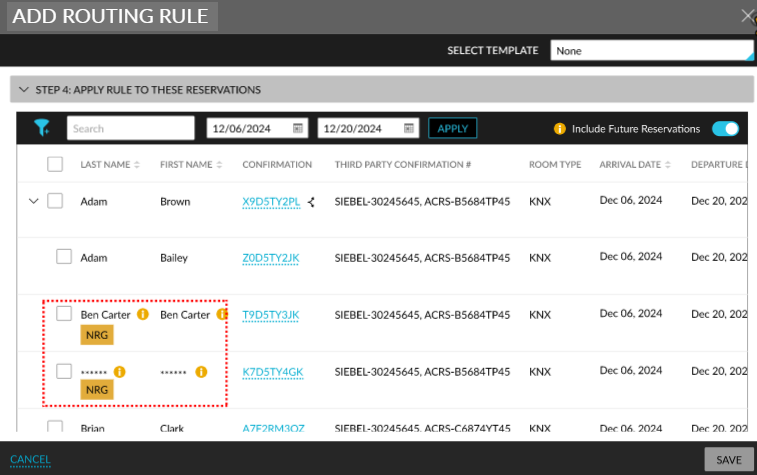
Indicating Non-Registered Guests when Selecting Reservations for Group Routing Rules
Stay displays the NRG indicator and the masked or alias name of a non-registered guest when selecting the reservations applicable for a group routing rule.
The Enhanced NRG feature setting must be enabled to use this feature.
Once the feature setting is enabled, when users select a routing rule for a group (Group ➜ Folio & Routing Rules ➜ Folio section ➜ Group Reservation Rules ➜ +Add a reservation routing rule) and search for reservations in Step 4: Apply Rule to These Reservations section of the Add Routing Rule pop-up screen, the following changes are displayed:
First Name
-
The NRG indicator is displayed if the guest profile associated with the reservation is marked as NRG.
-
When the logged-in user is assigned the StayManageNRGReservations permission, the first name of the guest is displayed to the user.
-
When an alias name is configured for the guest, the alias name is displayed.
-
Last Name
-
NRG indicator is displayed if the guest profile associated with the reservation is marked as NRG.
-
When the logged-in user is assigned the StayManageNRGReservations permission, the last name of the guest is displayed to the user.
-
When an alias name is configured for the guest, the alias name is displayed.
-
Shared Reservations
-
For shared reservations, when the guest profile associated with the reservation is marked as NRG, the NRG indicator is not displayed. Either an asterisk (**) or the alias name is displayed along with an information icon. When users with the StayManageNRGReservations permission hover over the icon, the first and last names of the guest are displayed.